
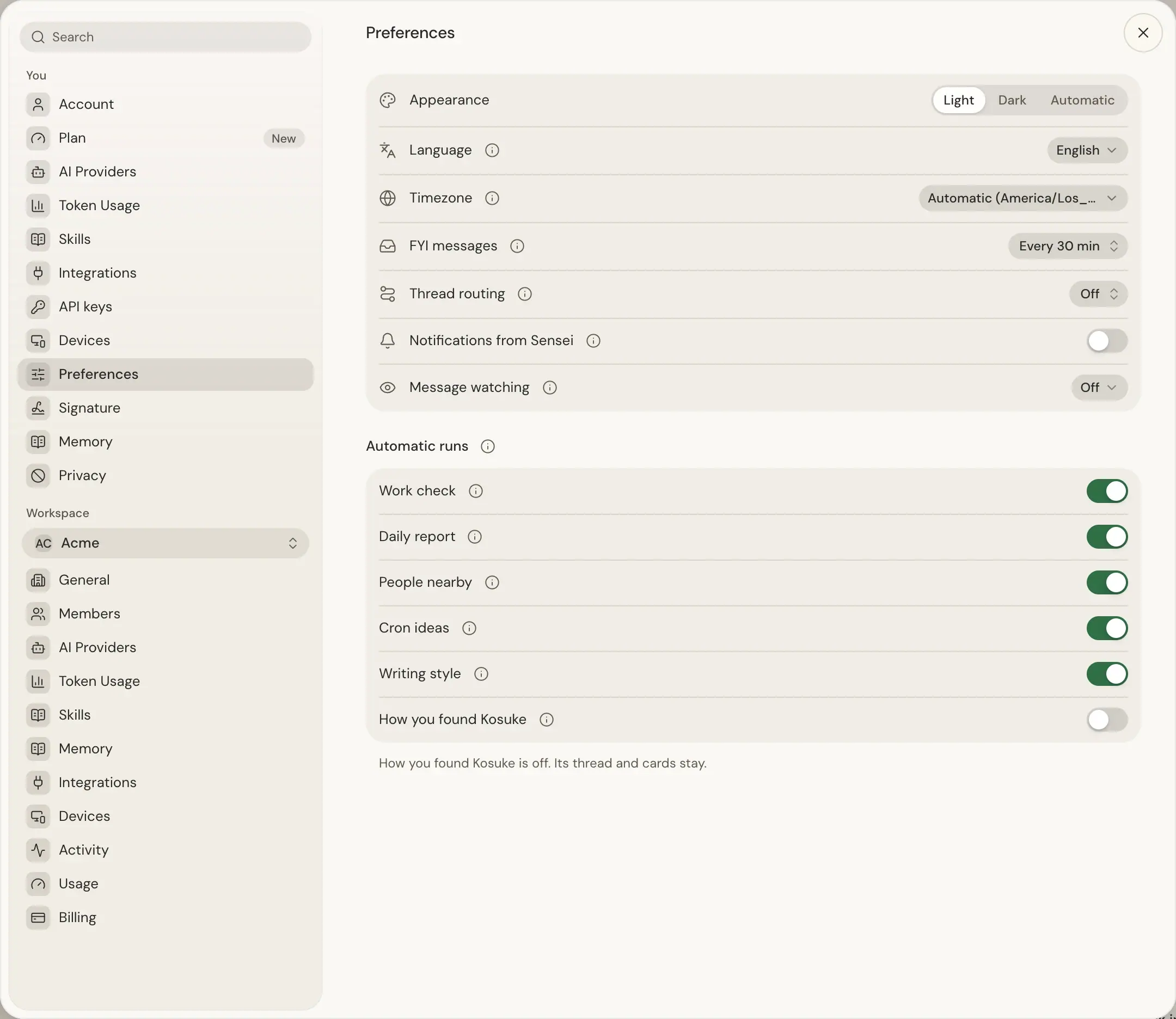
Preferences lists them in this order, with the name below on each switch:
| Name | Schedule | What it does | Who it runs for | Default |
|---|---|---|---|---|
| Work check | Weekdays at 09:00 and 15:00 | Shows the work that needs you now. | Members with a Sensei Chat and a known time zone | On |
| Daily report | Weekdays at 08:00 | Lists your stuck pull requests with a fix, and what you got done. | Every member with a stuck pull request or work done since the last weekday | On |
| People nearby | Mondays at 08:00 | Proposes people to see near you. | Members with a Sensei Chat and a watched channel, on Sensei Free too | On |
| Cron ideas | Mondays at 07:00 | Proposes crons from what you often ask. | Members who sent a message in a thread in the last 14 days | On |
| Writing style | Mondays at 06:00 | Learns how you write, so drafts sound like you. | Members who watch Gmail, Slack, WhatsApp or Telegram | On |
| How you found Kosuke | Weekdays at 10:00 | Asks once how you found Kosuke. Skip or an answer ends it. | Members whose account is at least 2 days old and who never answered | On |
Every run but Writing style posts in a thread of its own, named after it, such as Daily report, every weekday. Writing style works in a hidden thread and draws no card.
Turn a run off or on
- Open Settings > You > Preferences.
- Under Automatic runs, use the run's switch. Its row shows its schedule while it is on, or Off. Press the (i) on a row to read what it does.
The choice is yours, and the same on every device and in every workspace you belong to. A run Sensei adds later starts on. A switch saves at once, and the other switches wait until its save ends. If a save fails, the switch goes back and a message says so. Move the switch again to retry.
- Off stops the next run. A run that already started finishes. Its thread, its cards and any file it wrote stay, and a line under the list says what is off.
- On brings it back. Work check waits for its next time. Writing style, People nearby and Cron ideas run within minutes if you missed their Monday, then keep their schedule. Daily report catches up on a missed morning only until 18:00, and How you found Kosuke only until 16:00. Later, they wait for the next weekday.
On the iOS app, Preferences has no Automatic runs. Change them on the web or in the desktop app.
Work check and Cron ideas
On weekdays at 09:00 and 15:00 on your own clock, the app opens a Sensei turn in a thread named Work check, twice every weekday, without a message from you. Sensei reads your work across every workspace and draws a card for what matters now, such as a task due soon that has not started, work blocked on you, or two tickets that duplicate each other. When nothing matters, it draws no card. To stop it, turn Work check off.
On Mondays at 07:00 on your own clock, if you sent a message in a thread in the last 14 days, the app opens a Sensei turn in a thread named Cron ideas, every Monday. Sensei reads your threads, repositories and integrations for recurring work, and proposes at most three crons on one card. Create makes only the crons you pick. When no idea has evidence, it draws no card. To stop it, turn Cron ideas off in the same place.
Each card from these two threads starts with a line that says it is an automatic suggestion that repeats, and when. A card with no project also names its thread on the line above its headline.
The daily report
On weekdays at 08:00 on your own clock, Sensei posts one card in a thread named Daily report, every weekday. It needs no setup. To stop it, turn Daily report off.
The card lists each of your stuck pull requests with the reason and how long it has been stuck. A pull request is stuck when the first of these holds:
| Reason | What Unstick does |
|---|---|
| Tests green and approved: only your go-ahead is missing | Gives the go-ahead at the latest commit |
| Nobody was asked to review it | Asks the reviewer who reviewed your pull requests most |
| A review was asked more than 24 hours ago and is unanswered | Reminds the reviewer through their Sensei |
| It conflicts with or is behind its base for more than 24 hours | Approved, with the merge train on, hands it to the merge agent; off, asks its session to update with the base. Unapproved, it waits for its review |
| Its checks have failed for more than 12 hours, or its last turn failed | Resumes the session with the failure |
| Its session has waited for your reply for more than 12 hours | Opens the question |
| A merge round left it out twice | Resumes the session with both reasons |
| Nobody touched it for 14 days | Asks you to confirm, then closes the pull request and archives the session |
| Nobody touched it for 7 days | Resumes the session |
Pick the ones to fix and tap Unstick. A review someone asked of you more than 48 hours ago is on your list too.
Under Yesterday, the card tells what you shipped, what you decided with Sensei, what Sensei handled for you and your pace against your own last four weeks. On Monday it covers Friday to Sunday. Running lists your healthy sessions.
With nothing stuck and nothing done, you get no card. A pull request stuck more than 3 days is told once to a workspace admin's Sensei, with its title, reason and age only.
People nearby
Every Monday at 08:00 on your own clock, the app opens a Sensei turn in a thread named People nearby, every Monday, without a message from you. Sensei proposes at most 3 people worth seeing or writing to near where you are. It runs on Sensei Free too, where each run spends one of your free prompts. With none left, or with no watched channel, the run is skipped.
- Where you are. Sensei uses your shared phone location from the last 24 hours, then a trip in your calendar in the coming 7 days, then your time zone. A time zone gives only a region, and the card says so.
- Who it proposes. Only people from your one-to-one chats and emails, never teammates, groups or mail to several people. The run reads your Gmail and can change nothing in it. A person is proposed only when your messages, a signature, your calendar or Memory place them near you, ranked by how much you have written to each other. An unknown city means no card.
- Who it leaves out. A conversation that already waits for your reply stays with its reply card. A person you skip stays out for 30 days.
Each person is a card that says where you are, why they are on it, and how much you have written to each other, with a draft in your writing style and the conversation's language. Its first line says it is an automatic suggestion that repeats every Monday. Nothing goes out until you tap Send, and a card never shows coordinates, an address or a map link. When nobody matches, the run draws no card. To stop it, turn People nearby off.
Writing style
On Mondays at 06:00 on your own clock, Sensei reads the messages you sent yourself on the channels you watch and send from, Gmail, Slack, WhatsApp and Telegram, and updates a hidden file named writing.md. Sensei reads that file before it drafts a reply as you. When you watch such a channel and have no writing.md yet, it also runs once without waiting for Monday.
The run works in a hidden thread. It sends no message and draws no card. With Writing style off, your writing.md stays as it is and stops updating, and Sensei keeps reading it. See Your writing style for what it reads and writes.
How you found Kosuke
Once your account is at least 2 days old, Sensei asks you once, on a weekday at 10:00 on your own clock, in a thread named How you found Kosuke, once. Its card asks "How did you find us?" with three options: X or LinkedIn, Friend or colleague and Search or AI assistant. Pick one, or reply with your own words.
Answer saves it on your account. Skip ends it. Either way, it never asks again. It asks between 10:00 and 16:00 only, so never in the evening or on a weekend. To stop it before it asks, turn How you found Kosuke off.