
- Yes: the message goes to its conversation's thread, where a Sensei turn reads it and drafts what you need, usually a reply card.
- No: the message waits, then reaches you with the other messages that need nothing from you, together on one FYI card.
Only messages from other people are asked about. Your own messages are never triaged: Sensei reads them only to know you answered.
How a message is judged
The question is asked of each message on its own, before any Sensei turn runs. It reads the message with up to 5 earlier messages of the conversation, who it is from, and who it is written to: you alone, a group, a channel or a mail. It also reads what your workspaces build or run, and whether the sender is a teammate, a customer or someone you already talk to.
A message usually counts as yes when:
- A real person asks you something, asks for something, or names you.
- It is a direct message to you, or a reply in a thread where you wrote and it is now your turn.
- A bare "?" chases an answer you owe.
- Someone introduces a person, or adds one to a thread you wrote in, even with only "thanks, added Martin".
- A teammate, customer or partner brings you work about what your workspaces build or run, even in a channel that does not name you.
- A stranger asks about your own product, or asks to meet without selling you anything.
A message usually counts as no when it is:
- A newsletter, receipt, invoice, service or security notice, or a build, deploy or report notification.
- Marketing, a mail sent in bulk, or any message from a machine or a no-reply address.
- Group or channel chatter that does not name you and brings no work.
- A mail where you are only on Cc and nobody asks you by name.
- A cold pitch from a stranger who sells or recruits.
- A closer such as "ok", "👍" or "thanks" that brings nothing new.
When it is unclear whether a real person expects an answer, the answer is yes. If the question cannot be answered, because it fails or takes too long, the message goes to its thread as a yes: a card you skip costs less than a message you never see.
Some messages always go to their thread, whatever the answer:
- A direct message on LinkedIn or X. Sensei cannot mark those read without opening them, so an FYI there would stay unread.
- A reply to your own message that adds someone new to the thread.
- A new message in a conversation whose thread already has an open card, so the card stays current.
Yes: a card in the conversation's thread
Each watched conversation has its own thread, named after the chat, the mail's subject or the sender. It stays hidden until a card opens in it, so a conversation that never needs you adds no thread.
About 45 seconds after the last message of a burst, an Event Turn reads the new messages in that thread. The triage answer is only a hint there: Sensei reads the whole conversation and decides. It can:
- Draw a reply card with the sender, the exact message, and a full draft in your voice and the message's language. Nothing is sent until you tap Send.
- Draw another card the message asks for, such as a task card for a ticket, or a calendar card for a meeting.
- Decide the message asks nothing after all. Sensei then puts it on an FYI card in that thread, with Mark read, or leaves it for the FYI digest.
A reply card is a card like any other. Its Reply button reads Edit, and its negative button, such as Skip, closes the card and marks the messages it answers read on Gmail, Slack, Telegram and WhatsApp. See Cards and the Deck, and Replies in your voice for how the draft is written and how to edit it. When you answer the message yourself in the service's own app, Sensei reads your reply and closes the cards it settles.
No: the FYI digest
A message that needs nothing from you waits. It sends no notification and draws no card of its own. When it has waited long enough, Sensei lists it with the others on one card, the FYI digest, in a thread named FYI messages.
Choose when the digest comes in Settings > You > Preferences > FYI messages, on the web or in the iOS app:
| Choice | When the digest comes |
|---|---|
| Right away | Within minutes of a message that needs nothing from you |
| Every 30 min | Once the oldest waiting message has waited 30 minutes. This is the default. |
| Every hour | Once the oldest waiting message has waited an hour |
| Twice a day | Once the oldest waiting message has waited 12 hours |
The app checks every 5 minutes whether your digest is due. When a digest card is already open, Sensei updates it with the new messages instead of drawing a second one. Each digest lists only messages no earlier digest listed.
The digest never sends a notification, on any device. It waits in its thread and in Deck. See Notifications.
What the digest shows
The digest has one row per conversation, the newest first, with who wrote, the subject or channel, how many messages, and when. It names up to 50 conversations. Older ones are counted on one line, such as "2 older conversations, 7 messages".
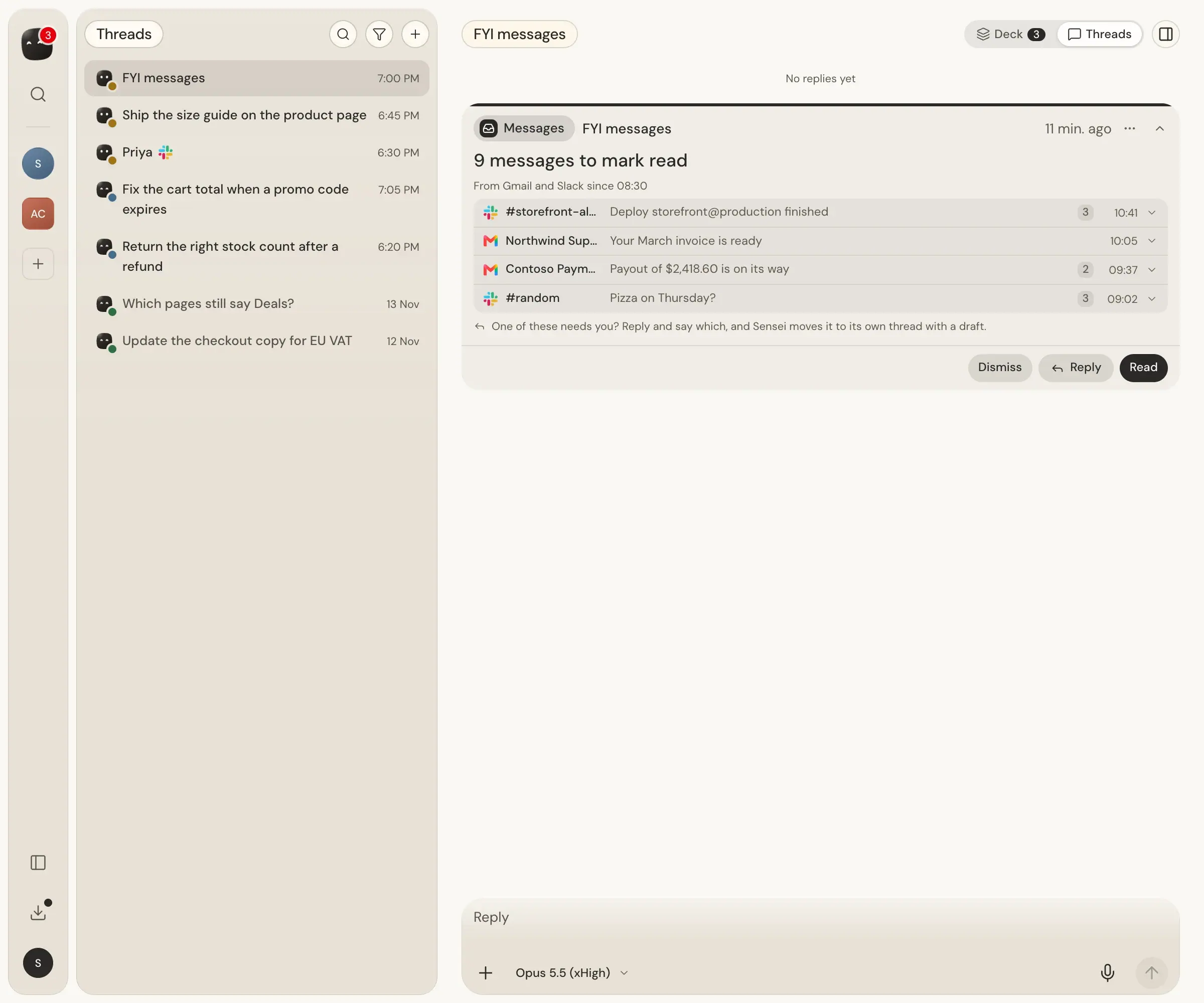
Press a row to read its unread messages on the card, the newest 3 first, then Show all. They are read from Sensei's own copy, so reading them marks nothing read on the service. Open in opens the conversation in its own app, in a new tab.
A Telegram row can read Also clears and a count: older unread messages of that chat that the digest's button marks read too.
If a message on the digest needs you after all, press Reply and say which. Sensei moves it to its own thread with a draft.
Mark everything read
The digest's button marks every message it lists read on the service it came from: the mail in Gmail, the messages in Slack, Telegram or WhatsApp. Nothing is sent, and nobody is notified. The app runs the Mark read itself, and the card's row reads Marking read in and the service, then Marked read in and the service, or Not marked read in and the service.
- When a service's limit holds a Mark read back, the app tries again by itself, with no tap, for up to 30 minutes. What it still could not mark stays unread, and the card says why.
- Messages a digest leaves unread come back in the next digest.
- A Slack thread reply cannot be marked read from Sensei. The card says "Opening the thread in Slack marks it read." with Open thread.
- LinkedIn and X messages stay unread on the site. Only opening the conversation there marks it read.
- Older unread messages that another open card holds, such as a reply card, are never cleared by the digest.
About once an hour, Sensei also checks Gmail, Slack and Telegram for messages you already read there, and takes them off its cards.
Work check
Triage looks at each message as it arrives. Work check looks at your whole day: on weekdays at 09:00 and 15:00 on your own clock, a Sensei turn reads your tasks, sessions, pull requests waiting for your review and unanswered messages across every workspace, and draws at most 5 cards for what matters now. When nothing matters, it draws no card. See Work check and Cron ideas.
Next steps
- Watching for which services Sensei reads and how to turn them on.
- Cards and the Deck to send, edit or skip a drafted reply.
- Notifications for which cards send a push.
- Your account and preferences for FYI messages and Message watching.